
This quick note is one solution (may not optimal) to prevent Colab from disconnecting during training your deep learning model.
disconnect Problem
Recently, my Google Colab notebook often gets disconnected after a while, and the data is lost. I searched and found a solution. So reshare this here.
SOLUTION
So to prevent this, we add a JS code to the console. Its purpose is to keep on clicking the page and prevent it from idling. So, I follow these steps:
- Open the chrome console,
Ctrl+ Shift + ito open inspector view
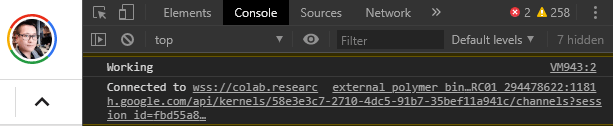
- Goto console.

- Paste and run the following code in the console:
function ClickConnect(){
console.log("Working");
document.querySelector("colab-toolbar-button#connect").click()
}
setInterval(ClickConnect,60000)
And remember to press Enter to start the script, it then can prevent your Colab notebook from disconnecting.


Love reading your posts everyday! Thanks for sharing!