
When starting Tensorflow (TF), many may find that the result cannot be obtained immediately. Rather, you must use a session or interactive session.
TensorFlow uses a dataflow graph to represent your computation in terms of the dependencies between individual operations. This leads to a low-level programming model in which you first define the dataflow graph, then create a TensorFlow session to run parts of the graph across a set of local and remote devices.
Tensorflow Core
GRAPH Dataflow
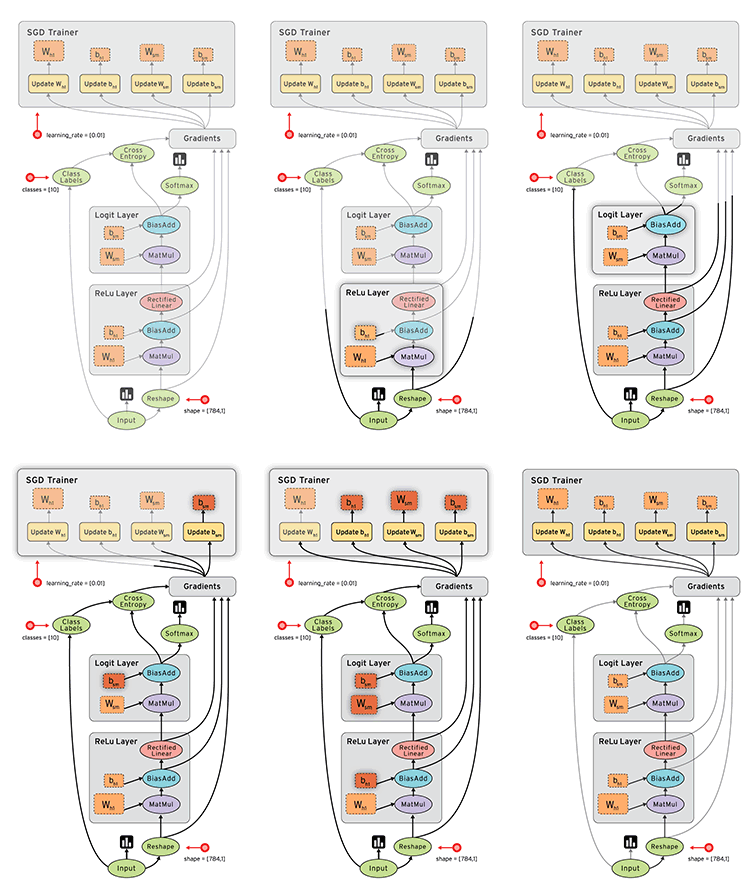
Dataflow (DF) is a common programming model for parallel computing. It models a program as a directed graph of the data flowing between operations, thus implementing dataflow principles and architecture.
In the figure, it demonstrates the perfect use of dataflow in a neural network.
DF graph, like other graphs, contains nodes and edges. Most TensorFlow programs start with a dataflow graph construction phase. In this phase, you invoke TensorFlow API functions that construct new tf.Operation (node) and tf.Tensor (edge) objects and add them to a tf.Graph instance.
Session
TensorFlow uses the tf.Session class to represent a connection between the client program. A tf.Session object provides access to devices in the local machine, and remote devices using the distributed TensorFlow runtime.
The tf.Session.run method is the main mechanism for running a tf.Operation or evaluating a tf.Tensor.
It means you get the tf.Operation via tf.Session.run (or eval).
Demo graph and session with python
In this section, we will not use any TensorFlow operations. Instead, we create a graph and operations, e.g. add, multiply, matmul, like using pure python.
Below is the jupyter notebook.

